HOW TO STAND OUT ONLINE

HOW TO STAND OUT ONLINE

Use a website to put your passion in the spotlight

So long, summer breaks and spontaneous holiday trips. After having time to unwind, relax, and contemplate your latest passion project, let’s put your innovative ideas onto a profitable platform. In other words, you either need to make a website or enhance the one you already have to make it stand out amongst the crowd.

Keep it local (with global in mind)

Supporting local businesses has become a modern movement, and that’s even more reason to capitalize on your dream. “BIA,” or Business Improvement Area, has become a common term in cities across Canada and the world, encouraging everyone to shop locally.

Local consumers want to support local businesses.

So, why shouldn’t it be yours? Now’s the time to make that happen.

You know your customers better than you think. They’re probably a lot like you.

Let’s throw out a hypothetical — you hear about a business in town. Regardless of how you heard about it, if it’s already piqued your interest, you’ll more than likely look them up online. From there, the business’s website will give you all the information you need to decide whether or not you want to check it out for yourself. Keep this in mind when updating your own website.

When? Where? Why?

These are good questions to keep in mind when building your website. Explain the concept in its simplest form — the ol’ “elevator pitch,” if you will. When asked about your business, you should be able to have a clear, concise answer. This should be true for your website, too.

It’s design time: How to build a website

As an entrepreneur, you’re already an innovator and creator. A website helps you showcase your ideas to Canada and beyond.

But websites can seem overwhelming, especially for those who don’t consider themselves tech-savvy or web gurus. You may find yourself contemplating over and over, “how to build a website … how to build a website … ” That’s why WiseHost’s website software makes it easy to build or update a website in under an hour.

Simply choose a template that matches your industry, add text to tell customers about your business or idea, then add a few photos. It’s as easy as that. With WiseHost’s website software, you’ll have the ability to completely personalize your website — so your one-of-a-kind idea will stand out the way it should.

The more you can talk about your business and how it’s a one-of-a-kind concept, the more you’ll differentiate your brand online (and in person).

Now you can showcase your business and give it the recognition that it deserves. For more detailed information, check out this post about how to build a better website in under an hour.

Your story sells

After all the hard work of putting your blood, sweat and tears into creating your passion project, oddly enough, self-promotion can be difficult for a lot of entrepreneurs. Just don’t overthink your story. The more personal, genuine, and detail-oriented your story is, the more likely your customers will have faith in you and your product. Plus, you’ll differentiate yourself online because the more you talk about what’s special about your business, the more your current and potential customers will realize just how unique and exciting your business actually is.

Here are a few questions to help get you started on updating the “About Us” section of your website:

  • How did you come up with your idea?
  • What did you sacrifice to make your dream of owning a business come true?
  • What or who were your influences? Did your grandfather or grandmother teach you secret tricks of the trade at a young age? Your audience wants to hear about it.

Now that you’ve successfully put your idea into the spotlight, communicating exactly how awesome your business is, and how it’s a place like no other in town (or in the world), you’ve also officially got your readers’ attention. Ideally, this will make regulars keep on returning, and new customers finally check it out for themselves. And, who knows? You just might inspire someone else to follow their dreams as well.
What is Google Data Studio and how can you use it?

What is Google Data Studio and how can you use it?

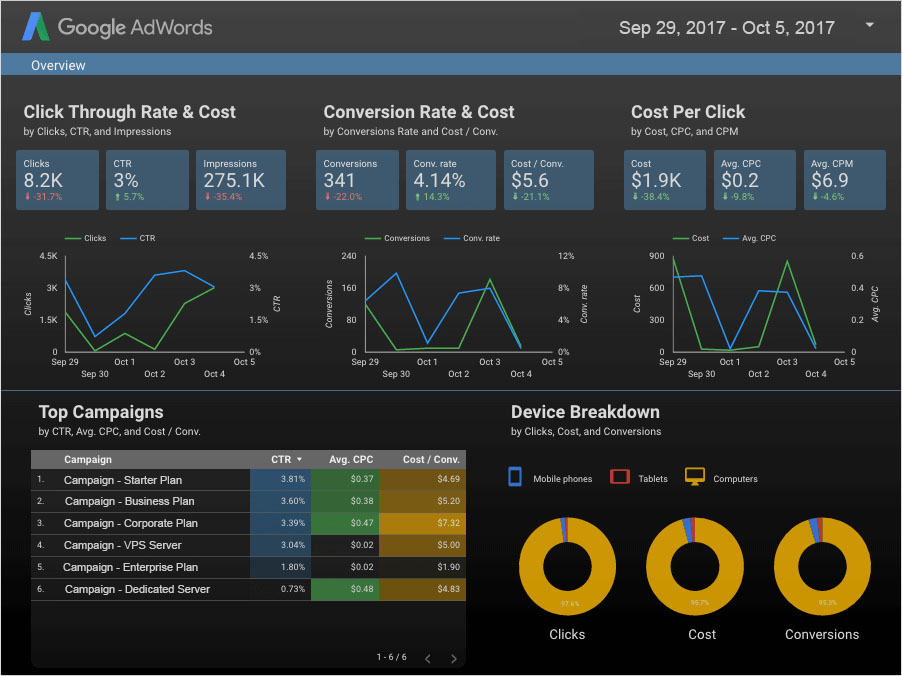
Google Data Studio allows you to create branded reports with data visualizations to share with your clients. Columnist Sherry Bonelli explains the benefits and how to try it out.

Analytics has always been a challenge for most digital marketers. It can be confusing, overwhelming and, quite frankly, difficult for the ordinary human to understand and decipher. In many cases, marketers don’t even report back their clients’ analytics because they’re just not sure where to start — partly because of information overload and difficult-to-understand data.

To make matters worse, there was really no easy way to provide their local SMB clients with an overview of how their site or campaigns were performing that was easy to read and understand. If you’re like most agencies that do provide clients with analytics reports, it typically means laboriously downloading Google Analytics data and putting that data into Excel spreadsheets to create charts and diagrams from there.

Google now allows you to create reports that even your clients will understand — thanks to Google Data Studio.

Google Data Studio is part of the Google Analytics 360 Suite — the high-end (i.e., pricey) Google Analytics Enterprise package. Since most of us can’t afford to spend that much money for an analytics tracking tool, we typically opt for the free version of Google Analytics. But Google has decided to give those of us using the free version of Google Analytics a taste of what’s possible.

What is Google Data Studio?

Google Data Studio (in beta) gives you everything you need to turn your client’s analytics data into informational, easy-to-understand reports through data visualization.

The reports are easy to read, easy to share and even customizable to each of your clients. You can select how you want to present the data — bar graphs, charts, line graphs and so on. You can even change fonts and colors and brand the reports with your logo.

One thing that’s cool about Data Studio is that you can pull in more than just Google Analytics data – you can even import Facebook data, as long as you put that information into a Google Sheet. (That’s right. Any reporting information you have on a Google Sheet can be pulled into Google Data Studio — and your beautiful reports!) If you can get your data into Google Sheets, it can show up in your reports.

The reports are also dynamic, so when there’s an update to the data source, the updated/new information automatically shows up on any reports that reference the source. Additionally, the reports are shareable, so you can grant people permission to view the reports and/or allow them to make changes.

Google Data Studio uses the same functionality as Google Docs and Google Sheets, so all you need to do is press the “Share” button to let your clients or other members of your team view or edit the reports.

How to Access Google Data Studio

To access Google Data Studio, visit https://www.google.com/analytics/data-studio and log in using your Google Analytics login information. Right now, if you’re using the free version of Google Analytics, you get a limited version of Data Studio. You can create up to five custom reports for free.

Note: This program is currently only available in the US, but it’s expected to be rolled out to other countries throughout the rest of this year.

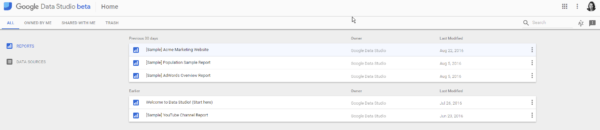
When you first log in. you will see some sample reports that will give you a good idea of the look and feel of the reports and the types of information you can pull into your custom reports once you get going. Go through each of these sample reports so you can see all of the possibilities.

Welcome Data Studio

When you click on the “Welcome to Data Studio! (Start here)” link, you’re taken to a visual, interactive tutorial that will walk you step-by-step through what Data Studio can do and how to get started. Be sure to check this out.

Click Data Studio

Google also provides you with a YouTube video that you can watch to get a quick overview of the tool, and it gives you a walk-through on how to connect your data sources and create your first report.

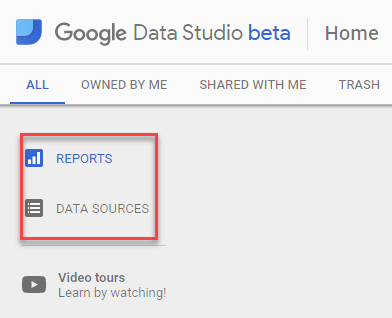
In the upper left-hand corner of the home page, you will see Reports and Data Sources. Reports lets you create reports and data visualizations. Data Sources are reusable components that connect a report to your data, such as Google Analytics, Google Sheets, Google AdWords and so forth.

Report Data

Google Data Studio uses the Google Drive interface, so it’ll be familiar to you if you use Google Drive. If you DO get lost, all you need to do is click the home button:

Google Data Studio Home

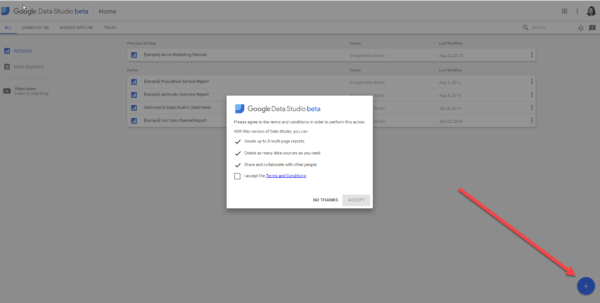
To create a new report, click on the blue plus (+) button at the bottom right-hand corner and accept the terms and conditions:

New Report

Then you’re off!

Is Google Data Studio right for you?

If you’re the type of person who likes working with spreadsheets, you might not think that Data Studio is a big deal. But for the huge number of us who hate spreadsheets, this is a godsend. (Finally! You can take a look at your analytics data — and it makes sense.)

Now, when you’re talking to your local clients, you can easily show them the results of your efforts in an easy-to-understand, brandable report! By sharing these reports with your clients, they will be able to see how your digital marketing efforts are paying off — which is definitely good for your business.

By Search Engine Land

How Artificial Intelligence Is Improving Magic Tricks

How Artificial Intelligence Is Improving Magic Tricks

By Joshua Rapp Learn
SMITHSONIAN.COM 
Computer scientists have designed a trick that uses an algorithm to search the internet for the words most associated with images

Forget lightning speed calculations, technological superiority and machine-like precision. Thanks to the efforts of some researchers, artificial intelligence can now create magic.

“We’ve done a number of different tricks involving artificial intelligence,” says Peter McOwan, a computer science professor at Queen Mary University of London.

McOwan and his coauthor, Howard Williams, recently published a study in PLOS ONE on using search algorithms to scour the internet to find the hidden mental associations magicians can use to astound their spectators.

“A piece of software is like a magic trick in that it has something that seems amazing,” McOwan says.

McOwan says he first got into magic when his father bought him a trick he picked up at a shop while on a business trip. He got hooked, but the hobby kind of dropped away later when he went to university. As he got into computer science, he realized that some of the same algorithms you can use to develop mathematically based card tricks were used to develop software and applications.

“I combined my passion for magic tricks with my passion for computer science,” he says, adding that what started off as a childhood hobby ended up as a whole field of research in artificial intelligence.

“Magic as a hobby is a fantastic thing to get into. It gives you self-confidence, it gives you the ability to learn communication skills—it’s a really good hobby to have.”

While the term “artificial intelligence” is often misconstrued to mean a whole assortment of robot apocalypse scenarios, much of what’s considered AI today is really born from algorithms. But using numbers to create tricks isn’t anything new—in fact many magic tricks involve math.

Jason Davison, a mathematical magician based in London, uses a minor sleight of hand and a few calculations to pull tricks like getting a given card you’ve chosen at any point in a deck you tell him just by shuffling the cards.

Another trick involves using a much more complex understanding of patterns and a little deck fixing to ensure that any way the spectator shuffles a deck, the cards will appear to have an uncanny order in which every set of four cards pulled from the top represent each of the four suits.

“There are many others with algebra and formulaic self-working tricks,” Davison says.

He has even designed a simple computer program that appears to be able to guess the correct color of a given card in a deck fixed in the same way as the latter trick. He gets the spectator to shuffle the cards as above, then divides the deck into two piles. He asks the spectator to guess the color of the cards in one pile one by one before revealing them and enters the answers into the program.

The robot then predicts the other pile, and (un)naturally gets it all right. But what might seem like robot mind-reading is really just a programmatic sleight of hand. Davison knows which colors the cards will be in that pile because they will be the opposite of the spectator’s pile based on the way the deck is shuffled. So when the spectator gets one wrong, he inserts an extra space before the answer he types. This cues the program that the answer is wrong.

So rather than controlling something we can’t comprehend, the program is merely a slave to Davison’s own knowledge of the pack. “The computer ‘guesses’ the coloring of the other pile using this information I have fed to it,” he said in an email.

McOwan has taken algorithms to the next level, though.

His trick works like this. A custom deck will have cards with words, and another pile of cards will have images. Spectators will be asked to instantly choose word cards that associate most closely with an image. (The researchers invite you to download the cards and instructions.)

The real magic in this trick comes in determining how far off the wrong meanings can be without seeming fixed. You might have a picture of a hamburger, for example. But if you have five words—hungry, fish, cat, boat and tree—it will be obvious to anyone which card the spectator will associate with the photo.

If the words instead are hungry, tray, lettuce, bun, and ketchup, the ability to guess the right answer seems much more uncanny though.

McOwan says that in order to determine the precise difference, he used a complex algorithm that searches the internet to find the words most often associated with particular images. The algorithm specifically looks at the words that popular commercial brands use to accompany their products—so in a sense he’s harnessing all the work of decades of marketing research to figure out which word associations we are most likely to make with an image. So even though it seems like you have a choice, your unconscious decision is locked in fate.

“This is basically a new probe into looking at how people’s brains work,” McOwan says, adding that a magician could do this without a program but it would take a huge amount of trial and error before figuring out the most likely answers.

Other tricks he has created with the help of a computer include the design of a jigsaw puzzle that appears to lose simple lines if you put it together a different way. It’s based on a type of illusion in which an algorithm has calculated the amount of changes you can make to shapes without people noticing anything is amiss.

This would be incredibly difficult for a human to design, but a computer program makes it quite easy.

Davison says that other computer-based tricks are coming out with new technology. He talks about trick dice that cue the magician to the numbers they show by sending a signal to a mechanical ticker attached to the magician’s leg, or even trick websites or applications that somehow send messages to magicians.

“I would say that AI definitely has a strong place in magic in the future,” he says.

Brian Curry, a professional magician in the Washington, D.C. area, agrees. He says that some of the tricks that would have astounded audiences 15 years ago no longer pack the same punch because there are apps that do the same work. But new technology can also help magicians stay on top of the game.

“Technology and magic are always correlated,” he says.

McOwan says there are possible uses for artificial intelligence in other forms of magic beyond card tricks. He says that he and other researchers did some initial work on mathematical models for optimizing sleight of hand tricks. It could also be used for designing optical illusions on the stage—tricks such as making a cabinet appear smaller than it actually is and giving someone space to hide in it.

McOwan says that right now, artificial intelligence can only help magicians gain the raw material for a trick. The real magic comes in conjuring up a spectacle, though—the performance art and pulling of a convincing rendition. To that end, while he might reveal to computer science students the magic tricks he creates personally, he considers some of the more clever mathematical tricks employed by professional magicians off limits.

“They are just so so clever,” he says, adding that he would perform them but never reveal them. “I would never give away the real secrets of the trade,” he says.

These computer-based tricks may become more and more popular, Davison says.

“But at the same time, nothing is more glorious than making someone childishly believe in magic again with nothing more than a simple coin.”

SMITHSONIAN.COM